

Meta Ads MCP server: How to connect AI to your ad account safely
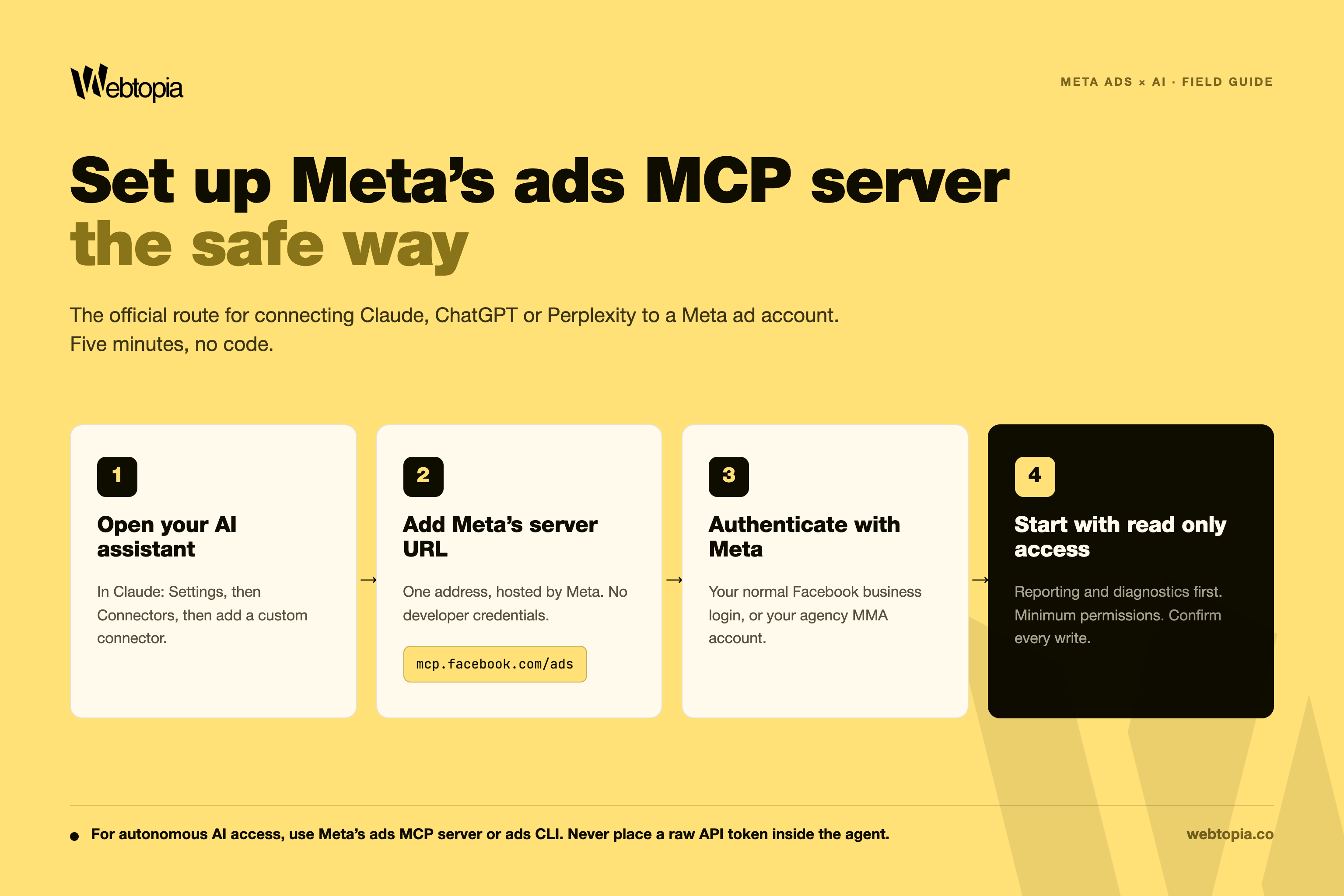
Table of content:
By Tristram Dyer, CEO, Webtopia · Published 27 July 2026 · Updated 27 July 2026
[Product note: Meta's ads AI connectors are in open beta. This page is updated as the toolset changes.]
Meta's ads MCP server is an official, Meta-hosted connector that lets AI assistants such as Claude, ChatGPT and Perplexity read and manage a Meta ad account through natural language. It launched in open beta on 29 April 2026, and it is one of two Meta-approved routes for connecting AI to an ad account, alongside the ads CLI. The third route, giving an autonomous AI agent a raw system user token so it can call the Marketing API directly, is the one Meta’s partner team advised us to avoid because it may trigger automated enforcement.
That last sentence is the reason this page exists. Earlier this month we were preparing to connect our own internal AI agents to client ad accounts. The agents were already built: they read account data, surface insights and score accounts during pitch analysis. Before connecting anything, we asked our Meta agency partner team whether our setup was approved. The answer changed how we route every AI integration we run, and it is guidance most advertisers have never encountered, because the consequences of choosing the wrong route are not spelt out in the public documentation.
This post sets out what Meta told us, what the official documentation says, and what a brand owner should ask before anyone, agency or in-house, plugs an AI assistant into their ad account.
What is Meta's ads MCP server?
Meta's ads MCP server is a remotely hosted service at mcp.facebook.com/ads that gives AI agents authenticated, real-time access to a Meta ad account. MCP stands for Model Context Protocol, an open standard that lets conversational AI tools connect to external systems. Because Meta hosts the server itself, an individual marketer can connect it through a supported AI assistant without building a custom API integration. You add the connector, authenticate through Meta’s standard login flow and start working. Businesses building the MCP connection into their own applications may still require a Meta app, permissions and developer setup.
According to Meta's developer documentation, the server covers comprehensive reporting, campaign creation and management, catalog and product data, signals and datasets, A/B testing and lift studies, activity logs, and Meta Business Help Centre search. It reads and it writes: an AI assistant connected this way can pull a performance breakdown, and it can also create a campaign, edit an ad set or upload creative.
The toolset is moving quickly, with new tools shipping most months since the April launch. The most reliable way to see the current list is to ask your connected AI agent what tools are available from Meta's ads MCP server. If you connected during the early beta and found it limited, it is already a different product.
What are the three ways to connect AI to a Meta ad account?
There are three routes, and they carry very different levels of risk. This is the part we asked Meta to clarify directly, because the distinction is subtle and the public documentation does not spell out the consequences.
The first route is the ads MCP server described above. It authenticates through a personal Facebook login or an agency MMA account, works with Claude, ChatGPT and Perplexity, and is officially endorsed by Meta.
The second route is the ads CLI, a command line tool installed with pip install meta-ads. It is built for engineering teams and AI coding tools such as Claude Code, authenticates with existing system user tokens, and is also officially endorsed. One CLI command replaces what used to take a couple of hundred lines of Marketing API code.
The third route is giving a system user access token directly to an autonomous AI agent so it can make Marketing API calls on its own. Meta’s partner guidance to us was to avoid this setup and route autonomous agents through the official ads MCP server or ads CLI instead. We were advised that direct calls from an AI agent holding a raw token may trigger automated enforcement, including account restriction or disablement, because that activity can resemble a compromised integration.
Based on that guidance, our internal policy is clear: autonomous AI agents should only access client ad accounts through Meta’s official AI connectors.
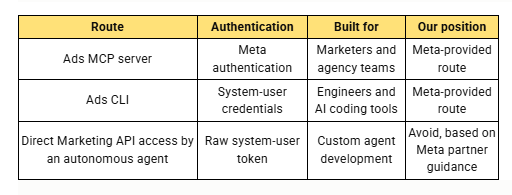
The distinction matters. A conventional backend integration using a registered Meta app and system user token, as many agencies and larger brands use for reporting and data pipelines, remains standard Marketing API usage. The risk arises when an autonomous AI agent holds the raw token and makes Marketing API calls directly.
Why does the connection route matter so much?
Because the potential failure mode is more serious than a warning email. Based on the guidance we received, an incorrectly configured autonomous integration could contribute to account restriction or disablement. For a DTC brand spending five or six figures a month on Meta, days of lost delivery during a restriction appeal cost real revenue, and the trigger would be invisible to you: an enthusiastic operator, in-house or at an agency, connecting an AI tool the wrong way with good intentions.
We hold Meta Business Partner status and speak with our partner team weekly, and this guidance still only reached us because we asked before connecting. Our view is that within a year, AI-assisted account management will be standard practice across the industry. The brands that get hurt in the transition will be the ones whose teams wired it up without asking how.
How do you set up the ads MCP server safely?
Setup takes about five minutes. In Claude, go to Settings, then Connectors, then add a custom connector with the URL https://mcp.facebook.com/ads and authenticate through the standard Meta login flow. Anthropic's own custom connector guide walks through it, and Meta's Business Help Centre article covers the Meta side, including how to disconnect. ChatGPT connects through developer mode and Perplexity through its connector settings on Pro and Enterprise plans.
The connection inherits the permissions of whoever authenticates. That is the single most important safety property to understand: the AI agent can do whatever the logged-in user can do, nothing more. So the setup discipline we apply on our own accounts is to grant team members the minimum ad account permissions they need, start every integration read-only, and require explicit confirmation before any write action. Depending on the AI assistant and its permission settings, write operations may require explicit confirmation. We treat those prompts as a backstop rather than the primary control.
Meta also now supports ads MCP server rules, documented in the Business Help Centre, which let a business define what AI agents can and cannot do on an account, enforced by the server itself rather than by trust. Agencies with partner access can set these rules for their own team's usage on the accounts shared with them. If your agency uses AI on your account and has not mentioned rules, that is worth a conversation.
What is AI account management actually good for today?
Meta's positioning is that the MCP suits conversational work while the CLI suits automation, and our experience of the beta matches that. The workflows that have earned a place in our week are the unglamorous ones: morning day-over-day checks that flag any campaign whose spend, CPA or ROAS moved more than fifteen per cent, signal health diagnostics before client calls, and structure audits that would otherwise be an afternoon of Ads Manager tab switching. We also run our own agents that read account data and score prospective accounts during pitch analysis, which is the integration that prompted our original question to Meta.
What we would not do yet is hand any AI agent unattended write access. The product is in open beta and shipping fast, and the honest reading of a fast-shipping beta is that reporting and diagnostics are dependable today while autonomous campaign management is not.
What should a founder ask before anyone connects AI to their account?
Three questions cover it. Ask which route the integration uses, because the only acceptable answers are the official MCP server or the ads CLI. Ask what permissions the authenticating user holds, because the agent inherits all of them. And ask whether MCP server rules are set on the account, because rules turn a policy into an enforcement.
If your current agency cannot answer those questions crisply, that tells you something about how the rest of the account is run. Growth on Meta now depends on operational detail like this compounding quietly in the background: connection routes, signal health, creative variance, attribution you can actually trust. That is the standard we hold ourselves to across every account we manage.
If you want a second pair of eyes on how your account is set up, from AI integrations to the attribution gap between Meta and your actual revenue, that is exactly what our free growth audit covers. It takes a week, and you keep the findings either way.
Sources
- Meta developer documentation: Ads MCP server overview
- Meta Business Help Centre: Manage ads from an AI agent with Meta Ads AI connectors
- Anthropic: Get started with custom connectors using remote MCP
- OpenAI: Developer mode
- PPC Land: Meta opens its ad system to Claude and ChatGPT with new AI connectors (launch coverage, 1 May 2026)
Get weekly expert insights!
.png)

.png)
.png)
Turn your ad spend into real growth.
At Webtopia, we don’t just run ads. We build scalable growth systems designed for ambitious DTC brands. By combining performance marketing, creative strategy, and data-backed execution, we help founders scale without sacrificing profitability. Our clients see an average 6X blended ROAS every month, because great brands deserve more than short-term wins.
Book your call today and let’s build your next growth chapter together.
