

TikTok Smart+ Explained: How the New AI-Powered Campaign System Works for Ecommerce Brands
Table of content:
TikTok has quietly made one of its most meaningful performance advertising updates to date with the rollout of Smart+, a new AI-powered campaign system designed to simplify setup while improving results.
Smart+ is not just a new campaign type. It represents a shift in how TikTok expects brands to structure performance advertising, leaning heavily into automation, predictive AI, and creative-led optimisation.
In this guide, we break down what Smart+ is, how it works, how it differs from manual campaigns, and when ecommerce brands should use it.
What Is TikTok Smart+?
Smart+ is TikTok’s AI-driven performance advertising solution built to automate large parts of campaign setup and optimisation while still allowing advertisers to apply guardrails where needed.
Instead of manually managing audiences, bids, placements, and creative distribution, Smart+ uses:
- Historical account performance
- Predictive machine learning
- Real-time creative and delivery signals
to optimise campaigns toward your chosen objective with less manual input.
TikTok positions Smart+ around three core returns:
- Return on Investment through automated optimisation
- Return on Effort by reducing setup and maintenance time
- Return on Creative by using AI-assisted asset selection and generation
Smart+ vs Manual Campaigns: What’s the Difference?
Smart+ does not replace manual campaigns entirely. Instead, it gives advertisers two distinct paths depending on how much control they want.
Smart+ Fully Automated Campaigns
- Campaign Budget Optimisation (CBO) is required
- Targeting is largely automated with optional audience suggestions
- Placements are automatic by default
- Optimisation goals and budgets must match across ad groups
- Best suited for scale, efficiency, and stable performance
Smart+ Manual Campaigns
- Ad group budgets instead of CBO
- Full manual targeting available
- Different optimisation goals and bidding strategies per ad group
- Better for testing, learning, and tighter control
Smart+ is ultimately about when to intervene and when to let the system work.
How to Set Up a Fully Automated Smart+ Campaign
Fully automated campaigns are where Smart+ delivers the most efficiency gains, particularly for ecommerce brands running ongoing performance activity.
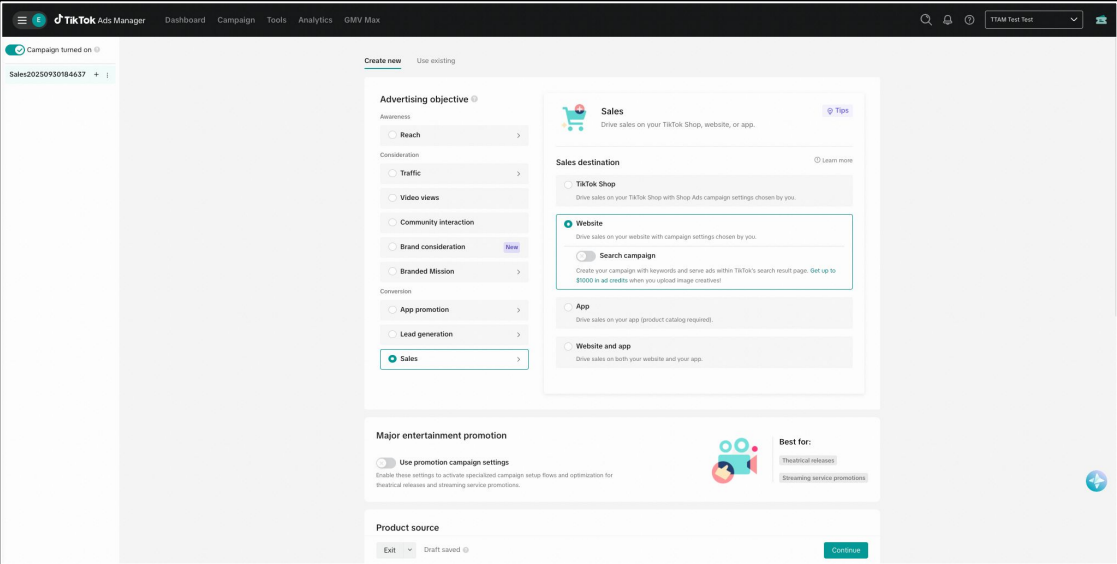
1. Choose Your Campaign Objective
Start by selecting your objective in TikTok Ads Manager. If you plan to use product feeds, enable the Use catalog toggle at campaign level.

2. Set Your Budget Strategy
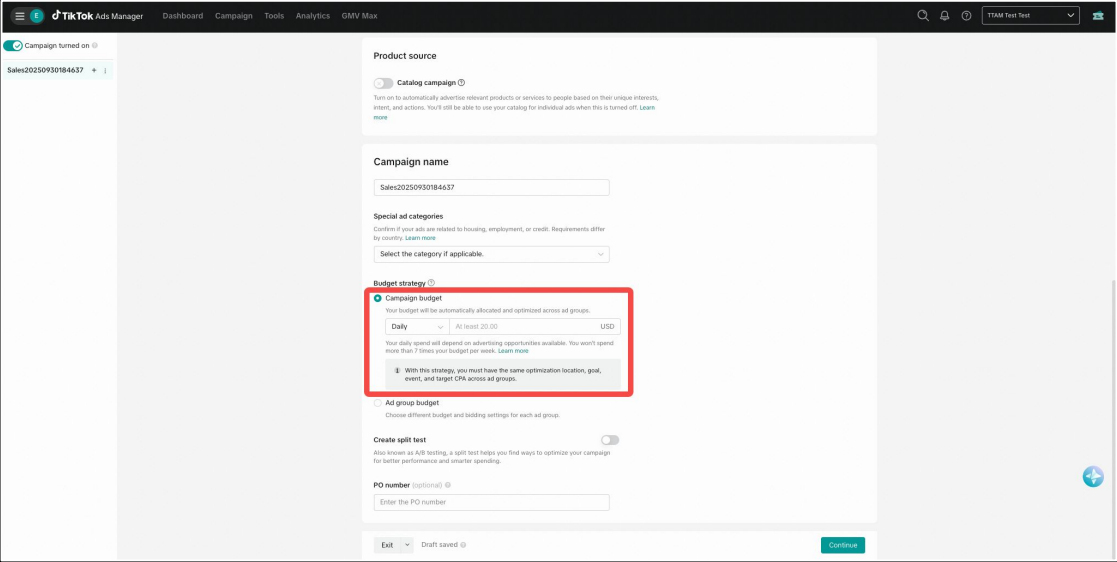
Smart+ automated campaigns require Campaign Budget Optimisation.
You can now choose between:
- Daily campaign budget
- Lifetime campaign budget
Once set, TikTok’s system dynamically allocates spend across ad groups.
3. Configure Ad Group Settings
If you use multiple ad groups:
- Optimisation goal must be the same
- Conversion event must match
- Budget structure must be identical
This ensures the AI can allocate spend efficiently without conflicting signals.


4. Set Audience Controls
Smart+ uses automatic targeting by default. You can apply Audience Controls to set boundaries, such as geography or age.
There is also an optional Audience Suggestions feature, which nudges the system toward certain audience types, but delivery is not guaranteed.

5. Placement, Brand Safety, and Destination URL
- Automatic placements are enabled by default
- Brand safety settings can be adjusted as needed
- Destination URLs and tracking parameters are configured at ad level
6. Add Creative Assets
You can add creatives from:
- Existing TikTok posts
- Your creative library
If a destination URL is included, TikTok will surface a Recommended tab, suggesting assets based on website content and recent performance data.
This is where Smart+ begins to actively reduce creative fatigue.

How to Set Up a Smart+ Manual Campaign
Manual campaigns inside Smart+ follow a similar structure but allow more control.
Key Differences:
- Budgets are set at ad group level
- Optimisation goals and bids can vary per ad group
- Full manual targeting is available via “Switch to custom targeting”
- Both daily and lifetime budgets are supported
This setup is useful for structured testing or when performance data is still limited.
New Smart+ Feature: Multiple Asset Groups
Smart+ now allows multiple asset groups within a single ad group.
This means you can:
- Use different destination URLs
- Test multiple product sets
- Combine different creative and copy variations
all within one ad group structure.
For ecommerce brands, this unlocks more structured creative testing without duplicating campaigns.
Bulk Import and Export for Smart+
For brands managing large accounts, Smart+ includes a Bulk Import and Export tool.
Using an Excel or CSV file, you can:
- Create or edit multiple campaigns at once
- Duplicate winning structures at scale
- Save time on repetitive setup tasks
TikTok recommends exporting an existing Smart+ campaign as a reference file before making changes.
Note that Bulk Import and Export requires Smart+ version 2.5.
When Should Ecommerce Brands Use Smart+?
Smart+ works best when:
- You have consistent conversion data
- You want to scale without increasing complexity
- Creative volume is strong
- Manual optimisation is becoming a bottleneck
It may be less effective when:
- Conversion signals are sparse
- You are still in early testing phases
- You need strict control over audiences or placements
For most established DTC brands, Smart+ is not an experiment. It is quickly becoming the default performance structure.
What Smart+ Signals About TikTok’s Direction
Smart+ reinforces a broader trend across paid media:
- Less manual control
- More system-led optimisation
- Creative as the primary performance lever
Brands that succeed will not be the ones fighting automation, but the ones building the right inputs for it.
Frequently Asked Questions
Is Smart+ replacing manual campaigns?
No. Manual campaigns still exist, but Smart+ is clearly TikTok’s preferred framework going forward.
Can I still control audiences with Smart+?
Yes, but controls act as boundaries rather than fixed targeting rules.
Does Smart+ work with product catalogues?
Yes. Smart+ fully supports catalogue-based ecommerce campaigns.
Is Smart+ suitable for small brands?
It can be, but works best once consistent conversion data is available.
What Ecommerce Brands Should Do Next
If you are already investing in TikTok performance, Smart+ is not something to ignore or delay testing.
The real question is not whether to use Smart+, but how to structure your account, creative, and measurement to let automation work in your favour.
At Webtopia, we help DTC and ecommerce brands adapt to platform shifts like this without losing clarity or control. If you are exploring how Smart+ fits into your broader growth strategy, now is the right time to review your setup. Book your discovery call!
Author: Julieta Cabrera
Get weekly expert insights!
.png)

.png)
.png)
Turn your ad spend into real growth.
At Webtopia, we don’t just run ads. We build scalable growth systems designed for ambitious DTC brands. By combining performance marketing, creative strategy, and data-backed execution, we help founders scale without sacrificing profitability. Our clients see an average 6X blended ROAS every month, because great brands deserve more than short-term wins.
Book your call today and let’s build your next growth chapter together.
